 Real ROAS
The ROAS in Ads Manager and the revenue in your store are two different numbers.
Real ROAS places your store's actual orders and revenue on every row in Meta Ads Manager and Google Ads — right next to what the platform claims.
$5 a month (₹420 in India). Cancel any time.
Every ad platform counts conversions by its own rules, and those rules stretch the numbers. Meta's window credits a purchase made days after the click. Google logs the same sale in its own column. Add both platforms' revenue figures and the total clears your store's order count by a margin. The ROAS you see in Ads Manager is built on those wider counts. Your store's actual orders divided by your actual spend tells a different story. Without both numbers on the same screen, you cannot know which campaigns earn and which ones only look like they do.
How it works
- Create an account and install. Create an account at itskaivalya.com/account, then open Real ROAS and download the Chrome extension zip from the link at the top of the app. Load it in Chrome via Extensions with Developer mode on (Load unpacked) — the server address comes pre-filled.
- Connect your data. Add your store orders (Shopify CSV or Shopify API), your GA4 property and your Meta and Google ad accounts. Each connection is checked when you save it. Each one reads your data only.
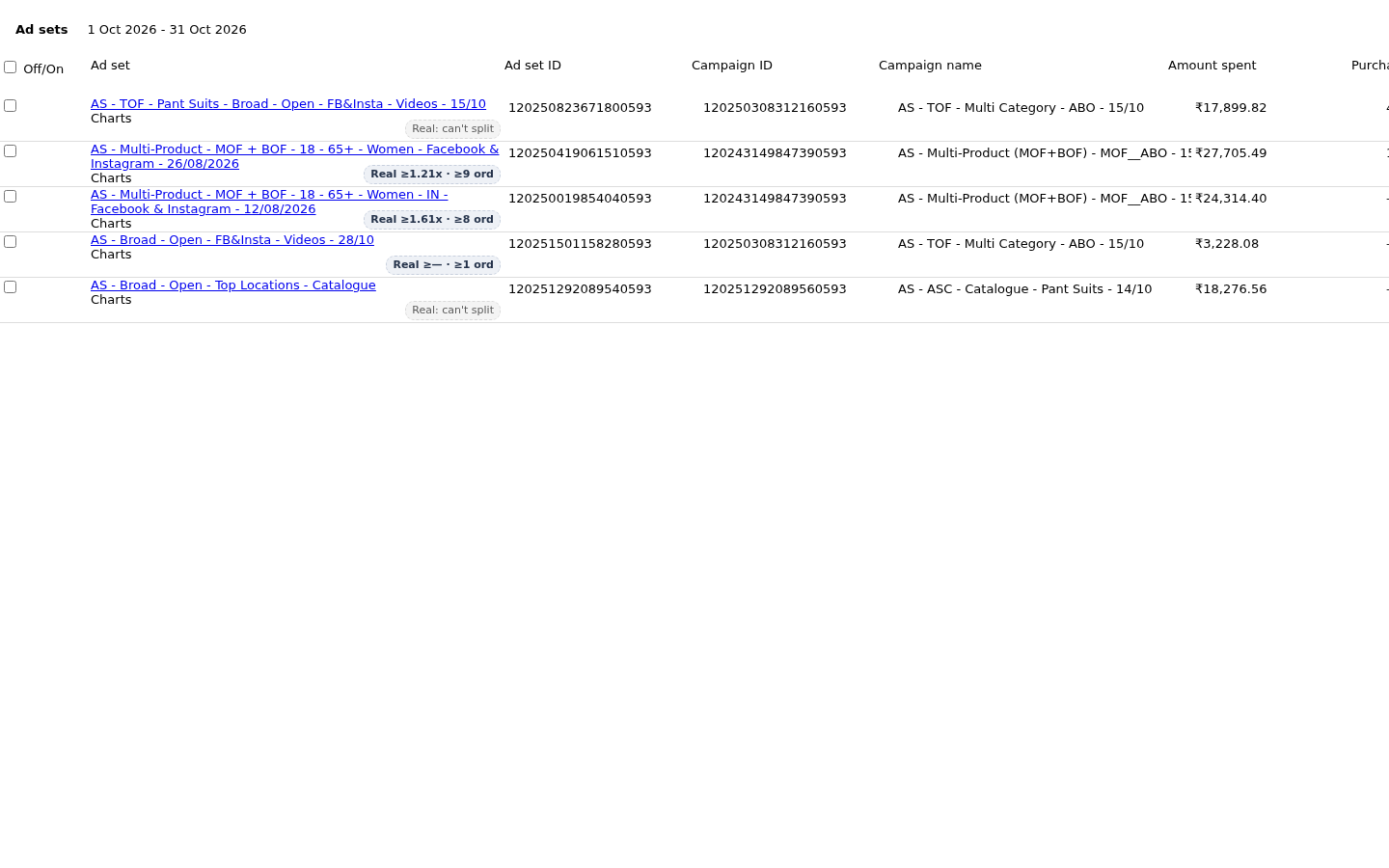
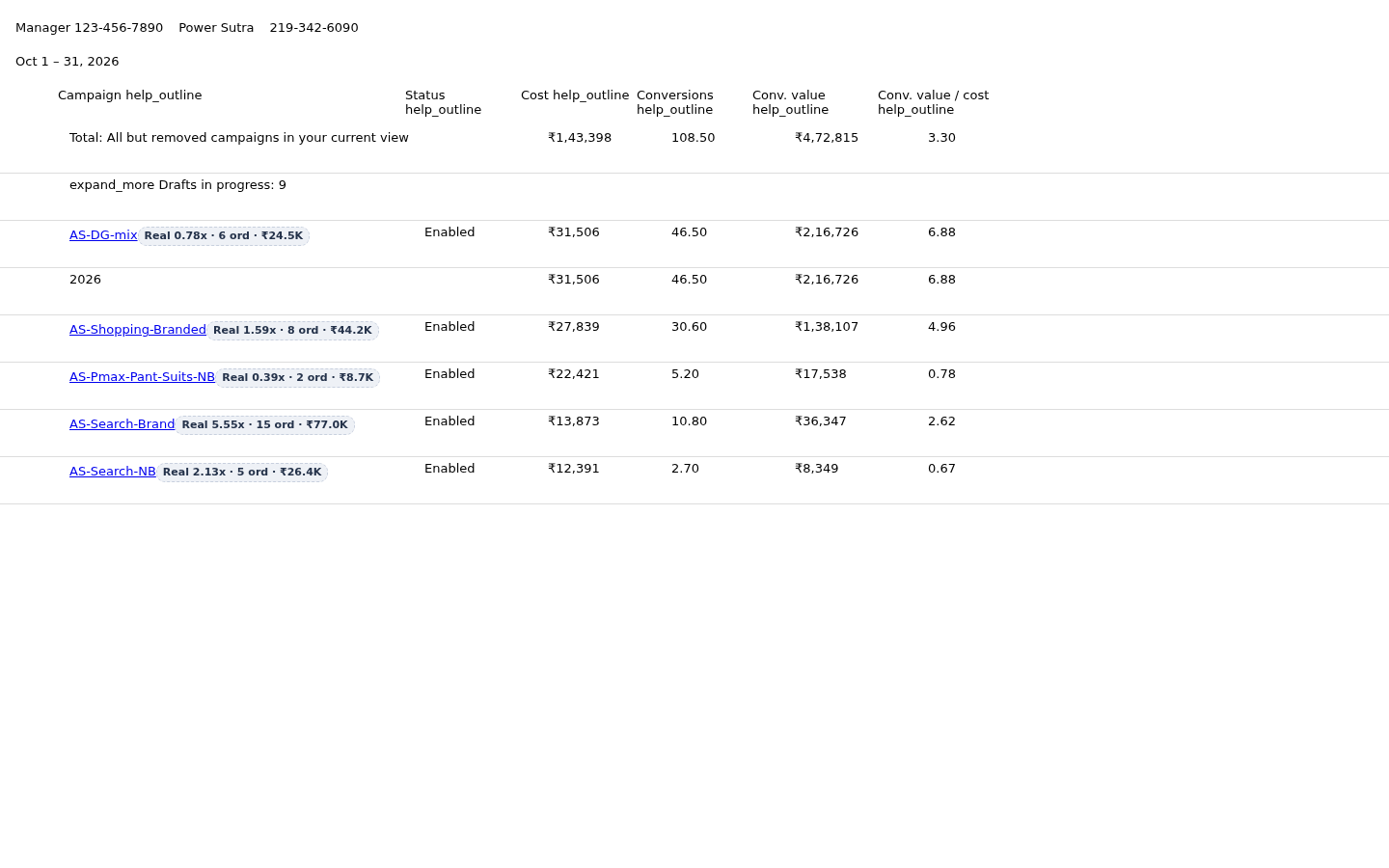
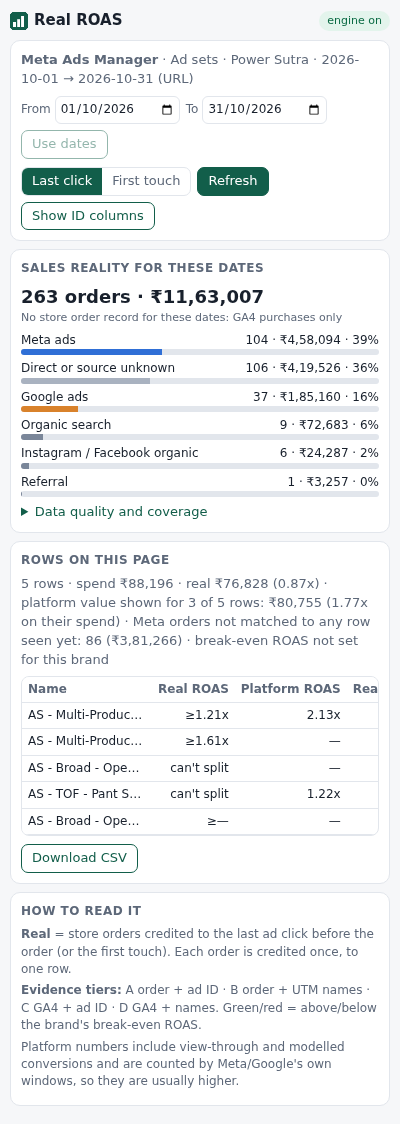
- Open Meta Ads Manager or Google Ads. A badge appears on every campaign, ad set and ad row with your real order count, revenue and ROAS — next to what the platform shows. The side panel lists sales by channel with a real versus platform comparison.
What you see
- Real orders, revenue and ROAS on every row in Meta Ads Manager and Google Ads, next to the platform's own figure
- Each order credited once — to one channel and one ad path, with an evidence tier from A to D showing how solid the match is
- Campaign, ad set and ad level breakdowns in Meta; campaign, ad group, keyword and ad level in Google Ads
- A side panel with sales by channel, data quality and a real versus platform comparison table, with CSV export
- COD orders handled: delivered cash-on-delivery orders counted as paid; returned-to-origin orders excluded when Shiprocket is connected
- A tooltip on every badge showing the platform's claim, the evidence tier and how the row was matched
Price
$5 a month, billed by card through Razorpay. In India, ₹420 a month. One login at itskaivalya.com/account covers the Chrome extension and the server behind it. Cancel any time from your account page — no call required.
$5 a month (₹420 in India). Cancel any time.
Questions
What does Real ROAS connect to?
It reads your store orders (Shopify CSV upload or Shopify Admin API), GA4 purchases, Google Ads data and Meta Ads data. A Google service account is used for GA4, Google Ads and Search Console. Access is read-only on every connection.
Can it change anything in my ad accounts?
Real ROAS reads data only. It computes the real numbers and displays them inside the platform. It does not create, pause, edit or delete anything in your ad accounts or store.
How does it handle cash on delivery and returns?
COD orders marked as delivered are counted as paid. When your Shiprocket account is connected, returned-to-origin orders are excluded from the count. Without Shiprocket, returned COD orders still appear in the total, and the side panel says so.
Our agency manages several brands. Does that work?
An agency admin account sees all brands and can add brand users. Each brand user logs in and sees only their own brand. Brand data is kept separate on the server; one brand user can see only their own brand's numbers.
How do we cancel?
Cancel from your account page at itskaivalya.com/account at any time. Access continues until the end of the billing period.
What happens to our store data?
Real ROAS stores the data it reads on the server, kept separate for each brand. The credentials for your store, GA4 and ad accounts are encrypted — one key per brand and connection. The data is used only to compute the numbers for your account.
Your ad spend is real. The orders in your store are real. Real ROAS puts both numbers on the same screen, inside the platform you already use.
$5 a month (₹420 in India). Cancel any time.