An AI coworker inside the project tool you already use
An AI teammate only for the people who need it: 5 USD a month, or your own Claude or OpenAI key. No workspace upgrade, no credits to run out, and it speaks when you @mention it.
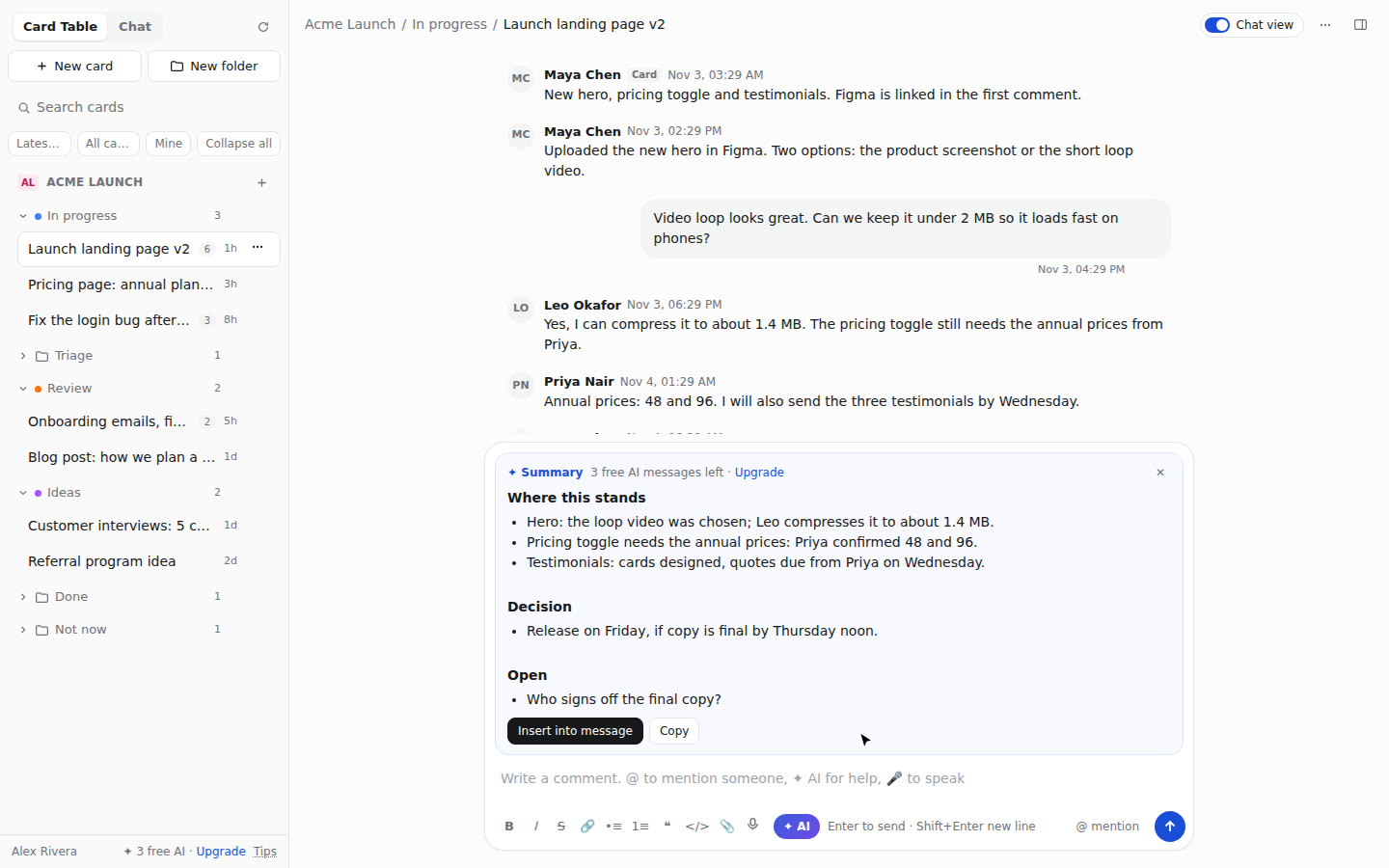
Your cards, chats and pings in one fast chat view, plus a teammate that drafts the reply, summarises the thread, turns a conversation into tasks and types your voice notes. Switch it off any time and everything is exactly where it was.
Browser extension for Chrome, Edge, Brave and Arc. Your work stays in your own tool. Using Basecamp? Connect it from the website and install nothing.
Four days to a clearer project
Use one real project to practise catching up, finding actions and seeing what needs attention.
What teams say about the AI in their project tools
We read 1,331 public threads from 2025 and 2026 about project tools. The same three complaints came back, and each one is how AI Coworker is built.
"Billed per seat, for everyone"
Teams are asked to upgrade a whole workspace so two people can use AI. Here: 5 USD a month for each person who wants it, or free with your own key.
"Metered in credits"
Credits run out mid-month and agents burn many per run. Here: a plain count of AI tasks a day that you can see, and no limit on your own key.
"Pushed at me, can't turn it off"
Popups and buttons nobody asked for. Here: it does nothing until you ask or @mention it, and signs every answer "✦ AI Coworker".
Problems we fixed, in your words · Compare with built-in AI and shared cloud agents · What it reads, sends and keeps
Project tools hold the work. Getting through them is the slow part.
Teams lose hours clicking between boards, cards, chats and pings, re-reading long threads, and turning conversations into to-dos by hand.
Without it
Open a board, open a card, scroll forty comments, switch to the chat, find who said what, copy it into a task, write the update, repeat for every project.
With AI Coworker
Every card and chat is one click away in a single list. Ask for the summary, the next reply or the action items, check it, send it. Speak instead of typing when that is faster.
What it does
AI Coworker works with your existing account. When you use AI, your request and relevant context are sent through our server to an AI provider. Switch the view off to return to your tool’s normal pages.
Boards become chats
Columns are folders, cards are conversations. Search, sort by latest activity, filter to open or mine, hide what you never use.
An AI teammate in every thread
Mention @AI Coworker in a comment and it answers in the thread. Or use ✦ AI to draft a reply, summarise a long card or list the action items, and check the draft before you post it.
Chats into tasks
Turn the action items from a conversation into real cards in the folder you choose, in one go.
Voice notes as text
Speak and it is typed into the message as you talk, in ten languages. Edit it, then send. Nobody has to listen to audio.
Everything one right-click away
Move, copy, assign, set due dates, watch, archive, colour, reorder. Drag cards between folders. Select many and act on all of them.
Project chat and direct messages
Your project's chat and private messages with the people on the project, in the same view, with history, boosts, files and mentions.
Ask about any web page
Open the side panel on any site: ask about the page, explain its console errors, or send the link (YouTube with its timestamp) to a task as a comment.
Built-in playbooks
Answers follow proven engineering, delivery and review playbooks when your question calls for them.
Your code host, connected
Connect GitHub, GitLab or Gitea/Forgejo with a token you control and browse your repositories. Code tasks currently run on GitHub.
Works where your team works
Six tools get the chat view and the AI teammate: Basecamp, Trello, Jira, Asana, monday.com and ClickUp (all in beta except Basecamp; monday.com and ClickUp need your own access token because they let nothing else in). Eight more get the AI side panel on every page: Notion, Linear, Wrike, Smartsheet, Airtable, Zoho Projects, Teamwork and Microsoft Planner. Pick yours for a short video, the steps and the price.
See it in action
One feature per clip: Basecamp as you know it on the left, the same thing on the right after one click on the Chat view switch.
Recorded in the live demo with a made-up team. Basecamp is a trademark of 37signals, LLC; AI Coworker is an independent extension, not made by 37signals.
Simple pricing
Start free. One AI task is one answer (a summary, a drafted reply, an @AI Coworker answer, a page question) or one code change. The chat view and every non-AI feature are free on every plan.
- No AI task limit
- OpenAI- or Anthropic-compatible key
- Your requests go through our server to your chosen AI provider
- 5 AI tasks a day
- Our AI, nothing to set up
- Code changes on your own GitHub, with a preview link
- Cancel any time
- 20 AI tasks a day
- Our AI, nothing to set up
- Code changes on your own GitHub, with a preview link
- Cancel any time
No credits to run out
Most project tools now meter their AI. AI Coworker counts plain AI tasks a day, and with your own AI key there is no limit at all. What each tool's own pages said in November 2026 (prices change often):
| Tool | Its built-in AI | With AI Coworker |
|---|---|---|
| Asana | AI Teammates on paid plans (from 10.99 USD a user a month): 5 requests a user a month, then 0.50 USD a request | 5 or 20 AI tasks every day, or no limit with your own key |
| Trello | Paid plans only; nothing on the Free plan | Works on the Free plan, with @AI Coworker in the card's comments |
| Jira, monday.com, ClickUp | Monthly AI credits per plan that run out; agents use many credits per run | A daily count you can see in Settings; nothing pauses mid-month |
| Notion | Agents on Business (20 USD a member a month) plus 10 USD per 1,000 credits | From 5 USD a month, free with your own key |
| Basecamp | AI comes from add-ons: shared cloud agents bill company-wide credits (from 19 USD a month at the time of writing) | @AI Coworker answers in the thread, even when nobody has a browser open, for 5 USD a month per person |
AI Coworker can also make a code change on your own GitHub and post a preview link in the task. Full comparison.
Questions
Where does my project data go?
Your work remains in your project tool. When you ask the AI, your request and relevant context (such as the thread, card or page) pass through our server to the AI provider. See our privacy policy for details.
Does it change anything in my account?
Only what you do: a message you send, a card you move. Switch the chat view off and you are on the tool's normal pages, with everything in place.
Who else can see my workspace?
You sign in to your own project tool with your own login. AI requests and their context pass through our server to the selected AI provider. See our privacy policy for details.
Can I mention the AI in a comment?
Yes: type @ and pick AI Coworker in any comment or chat. It reads the thread and answers there. For a website or code change it works on your own GitHub and posts the pull request and preview link back.
Can I use my own AI key?
Yes, and it is free on every plan with no AI task limit. In Settings, under AI provider, choose OpenAI-compatible or Anthropic-compatible and paste the address, model and key. The key is stored encrypted and used only for your account's requests, which pass through our server to your chosen provider.
Does the AI post things by itself?
Summaries and drafted replies wait for your click. It posts on its own only when someone writes @AI Coworker in a comment, and then every answer starts with "✦ AI Coworker". Security and data lists exactly what it reads and keeps.
Can I use it in Basecamp without installing anything?
Yes. Create a free account, connect Basecamp on the getting-started page, switch on a project and write @AI Coworker in a comment. Install the extension later for the chat view.
Which browsers?
Chrome, Edge, Brave, Arc and other Chromium browsers on desktop.
What happens after my 3 free AI tasks?
The chat view and every non-AI feature keep working. For more AI: Starter is 5 USD a month for 5 AI tasks a day, Pro is 20 USD a month for 20 a day, or connect your own AI key for free with no limit. Today's tasks start again at midnight in your time zone.
How do I pay and cancel?
Click Upgrade in the extension or on the pricing page. Razorpay takes the card payment and renews it monthly. Cancel any time from your account page; the plan keeps working until the end of the month you paid for.